





- Language
- English
- Compatible XF 2.x versions
- 2.2
- 2.3
Converts all hot linked images to attachments.
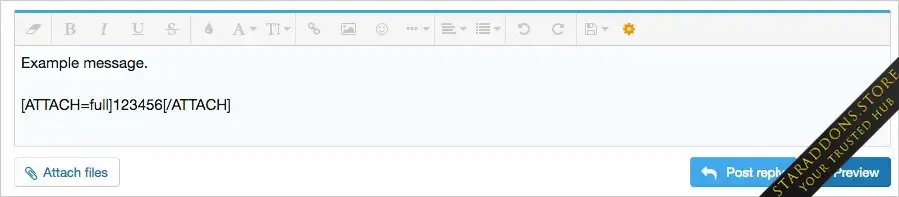
The Convert image all add-on will convert hot linked images in messages to attachments. Hot linked images are those images that have been inserted using the Image icon in the editor toolbar.
This add-on is run manually and is used to process all hot linked images in all posts.
(Example of hot linked image)

Features:
Although the screenshot above says you can use 0 or blank, this add-on requires you to use a positive value for the Maximum attachment image dimensions settings. I suggest using 2500 x 2500.
Admin control panel -> Setup -> Options -> Attachments -> Maximum attachment image dimensions
How to use:
The Convert image all add-on will convert hot linked images in messages to attachments. Hot linked images are those images that have been inserted using the Image icon in the editor toolbar.
This add-on is run manually and is used to process all hot linked images in all posts.
(Example of hot linked image)
Features:
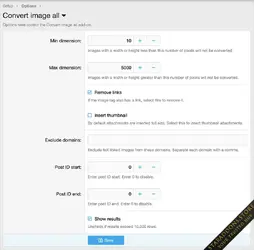
- Images greater than maximum width and height settings in Admin Control Panel will be resized.
- Links surrounding attachments automatically removed.
Although the screenshot above says you can use 0 or blank, this add-on requires you to use a positive value for the Maximum attachment image dimensions settings. I suggest using 2500 x 2500.
Admin control panel -> Setup -> Options -> Attachments -> Maximum attachment image dimensions
How to use:
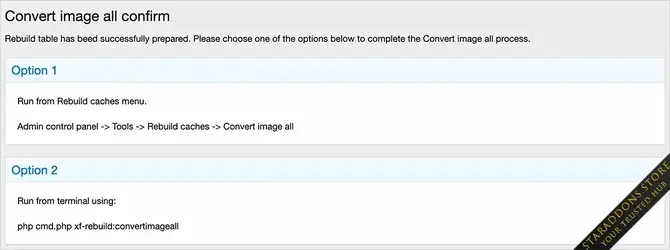
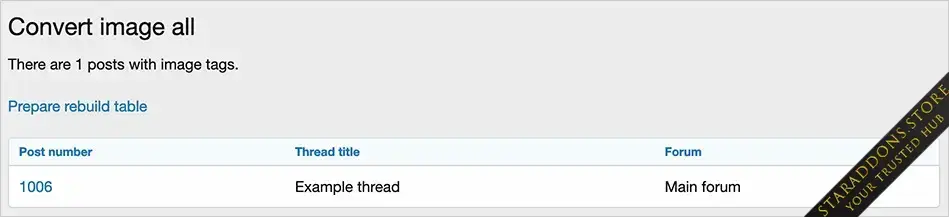
- In your browser add 'convertimageall' to your forum URL.
- Click the 'Prepare rebuild table' link.
- Follow instructions on Convert image all confirm page.
-
 AndyB Convert Image All5.webp
 -
 AndyB Convert Image All4.webp
 -
 AndyB Convert Image All3.webp
 -
 AndyB Convert Image All2.webp
 -
 AndyB Convert Image All1.webp
![[tl] Link Confirmation](https://data.staraddons.store/resource_icons/0/594.jpg?1768685280)
![[cXF] Admin Search on Index](https://data.staraddons.store/resource_icons/0/598.jpg?1768687233)


