





- Language
- English
- Compatible XF 2.x versions
- 2.0
- 2.1
- 2.2
- 2.3
A fully integrated map system based on forums and threads.
Live example here: https://www.southbayriders.com/forums/showmap/?id=dealers
Features:
- Individual maps are created for each forum.
- Map markers link back to threads.
- All phrases start with showmap_ for your convenience.
Install and configure the View map add-on located here:
https://www.xf2addons.com/resources/view-map.24/
The View map add-on allows you to easily create the map bbcode.
Setup step 2:
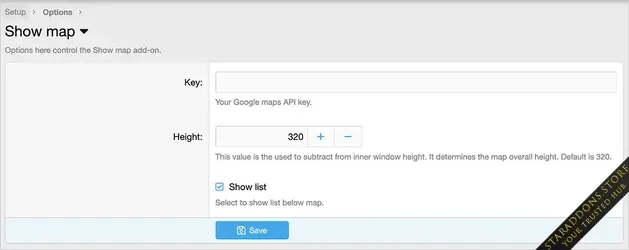
Update the Options page with your Google JavaScript API key.
Setup step 3:
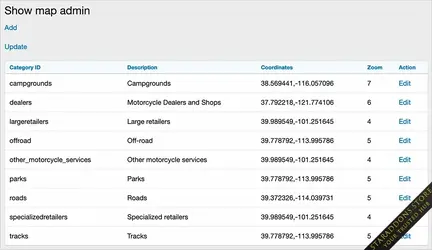
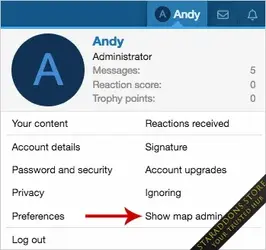
Using the 'Show map admin' link in the visitors tab, create a map category by clicking the Add link.
Example:
Description - dealers
Detail - Dealers and shops
Coordinates - 37.339386,-121.894956
Zoom - 6
Setup step 4:
Create a forum where you will have threads of a certain type. For example you would have a Dealers forum. Each thread will represent a dealer which has information about that particular dealer. In the first post of each thread you will need to insert a map bbcode. This code looks like this:
[map=37.339386,-121.894956]View map[/map]You can get this map bbcode using the View map add-on.
Setup step 5:
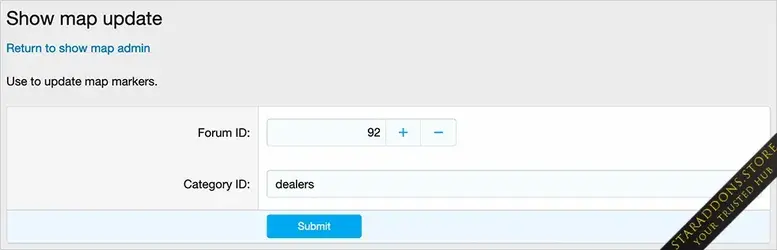
Using the 'Show map admin' link in the visitors tab, click the Upgrade link which will create the map.
Note anytime you add a thread to the forum you created in step 4, you will want to update the map by using the Update link.
Showing the map:
Add 'showmap' to your forum URL followed by a query parameter, this will be one of your category IDs.
Example:
https://www.domain.com/showmap/?id=dealersYou can create a Public navigation or Widget for the URL which calls a specific map.
Public navigation example:
This example shows how you can create a link in the sub-navigation of the Forums tab.
Admin control panel -> Setup -> Public navigation -> Add navigation
Navigation ID = showmap
Title = Show map
Parent navigation entry = Forums
Display order = 1000
Type = Basic
Link = {{ link('showmap/?id=dealers') }}
Database modifications:
This add-on will create two tables in your database:
andy_show_map
andy_show_map_data
-
 AndyB Show Map5.webp
 -
 AndyB Show Map4.webp
 -
 AndyB Show Map3.webp
 -
 AndyB Show Map2.webp
 -
 AndyB Show Map1.webp

![[TylerAustin] Music Thread Starter: Display Music Poster In Search Results - XF2](https://data.staraddons.store/resource_icons/0/377.jpg?1765673279)
| XF 2.3 Add-ons (Premium)
[TylerAustin] Music Thread Starter: Display Music Poster In Search Results - XF2
1.0.2


